New Tiers availableMore feature, Up to 10 Million AI-Tokens for free
Read blog postYour images should fit every layout.
Keep one original and request the right variant through its URL. The Fairu Image Proxy handles size, crop and format during delivery. Your team can design layouts without exporting every image size by hand.
From upload to optimized delivery in 3 steps
You provide the original. Your integration requests size, crop and format; the proxy generates and caches the matching variant.
Upload your original
Upload your full-resolution image to Fairu. We store the original safely — no quality loss, no compression at this stage.
Request via URL parameters
Add width, height, format, or quality parameters to the image URL. Each combination is generated on-the-fly and cached automatically.
Delivered optimized
The generated variant is delivered and cached. Further requests can reuse it from the cache without generating it again.
Simple URL Structure
Simply append parameters to the URL to transform images on-the-fly.
https://files.fairu.app/{UUID}/{filename}?width={INT}&height={INT}&focal_point={STRING}

// Example
https://files.fairu.app/9f8687a9-9a4e-4fd2-9cd8-73cc6cd51fd7/hero-image.jpg?width=800&height=600Try it yourself
Adjust the parameters and see the result in real-time. The URL updates automatically.

https://files.fairu.app/9fad6214-3c0e-4f02-a0dd-16e9d42d302b/demo.jpg?width=800Transform images in real-time via simple URL parameters — no preprocessing or complex configuration required.
- Resize
- Scale and crop images dynamically with width and height parameters.
- Focal Point
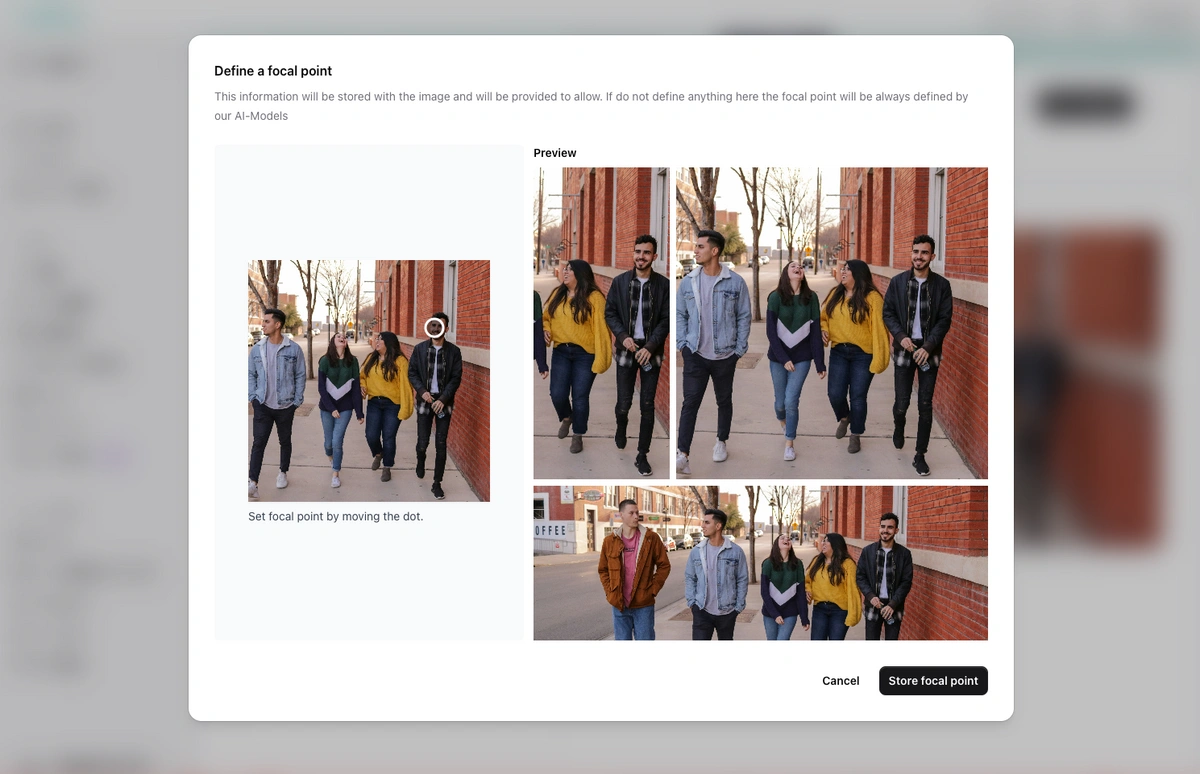
- Set the focal point yourself or determine it with an AI action. The focal parameter controls its use when cropping.
- Format Conversion
- Automatic conversion to WebP, the format the proxy emits by default.
- Quality Control
- Control compression with the quality parameter for optimal file size.
One original, every size on request
URL Parameters
Control size, format, and quality of your images directly via URL parameters.
width
Set the width in pixels for proportional scaling.
?width=800
height
Set the height in pixels, combinable with width for exact cropping.
?width=800&height=600
focal
Define a custom focal point for smart cropping.
?width=300&height=300&focal=0-0-1
format
Convert to WebP, JPG, or PNG for optimal compression.
?format=webp
quality
Set compression quality (0-100). Recommended: 75-90.
?quality=85
version
For videos: Choose low, medium, or high compression.
?version=medium
Not just images — the Fairu Proxy also optimizes video delivery with automatic thumbnails and HLS streaming.
- Video Thumbnails
- Automatically generated screenshots from videos, processable like regular images.
- Compressed Versions
- Access low, medium, or high compressed versions.
- HLS Streaming
- Enable HLS streaming for adaptive quality based on bandwidth.
Why Fairu Image Proxy?
Everything you need for modern image delivery.
Smart Caching
Every transformation is cached after the first request and served from European edge servers; replacing an asset invalidates its cached variants.
CDN
Delivery via a European CDN, operated and billed in Europe.
All File Types
Not just images — PDFs, Word documents, and videos are also optimized for delivery.
AI Optimization
A stored focal point guides the crop. Set it yourself or use an AI action to determine it.
Code Examples
<!-- Resize to 800px width -->
<img src="https://files.fairu.app/{UUID}/image.jpg?width=800" alt="A red bicycle against a brick wall" />

<!-- Resize and crop to exact dimensions -->
<img src="https://files.fairu.app/{UUID}/image.jpg?width=400&height=300" alt="A red bicycle against a brick wall" /><!-- Convert to WebP with 85% quality -->
<img src="https://files.fairu.app/{UUID}/image.jpg?format=webp&quality=85" alt="A red bicycle against a brick wall" />
<!-- Optimized for thumbnails -->
<img src="https://files.fairu.app/{UUID}/image.jpg?width=150&quality=75" alt="A red bicycle against a brick wall" /><!-- Custom focal point for smart cropping -->
<img src="https://files.fairu.app/{UUID}/portrait.jpg?width=300&height=300&focal=0-0-1" alt="Anna Bauer, head and shoulders" />
<!-- AI auto-detects focal point when not specified --><!-- Get video thumbnail -->
<img src="https://files.fairu.app/{UUID}/video.mp4?width=800" alt="The workshop, first frame of the clip" />
<!-- HLS Streaming Playlist -->
https://fairu.app/hls/{UUID}/playlist.m3u8Frequently asked questions about Image Proxy
Explore more Fairu features
Test image variants in your layout.
Upload one original and compare sizes, crops and formats directly in your project.
- No credit card required
- Trial with usage limits
- Cancel anytime